
.....obsolete user manuals, a lot of repair manuals, free service manuals, rare schematic diagrams, usefull service instructions, pdf books, how to repair instructions, lost operating manuals, old handbooks, tons of part lists, hidden service bulletins, your instruction books, informative repair tips, complete disassembly routines.....


What are you looking for?


Tektronix - RSA6114A - Spectrum analyzer
Manufacturer:
Equipment:
RSA6114A
Date:
2009
Category:
Group:
Sub Group:

Information

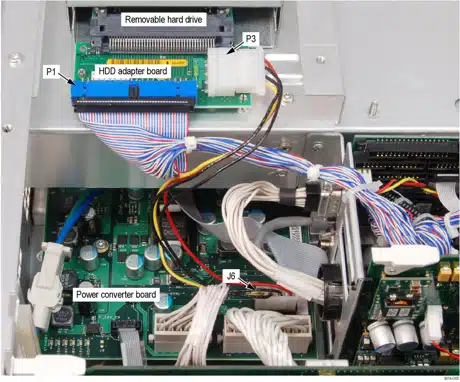
A processor system controls the RSA6100A instrument. The instrument features an XGA resolution flat-panel display, a transparent touch-screen, and a front- panel with direct access to commonly used RTSA features. You can also use the RTSA with a mouse or other pointing device, and/or a keyboard. The RTSA uses the Microsoft Windows XP operating system.

show more

2 Manuals

Service manual
Manual type:
Service manual
Pages:
102
Size:
4.6 MB
Language:
english
Revision:
Manual-ID:
071-1914-01
Date:
Quality:
Electronic document, no scan, very well readable.
Upload date:
July 27, 2020
MD5:
4d9d319b-71d5-88a4-3342-d0671c292f73
Downloads:
1215
Last month downloads:
16

Information

This document applies to softwware version 1.0.48 and above. General Safety Summary ...v Service Safety Summary...vii Preface...ix Manual Content ...ix Manual Conventions...ix Related User Documents ...x Operating Information Operating Information ...1-1 Theory of Operation Theory of Operation ...2-1 General...2-1 Signal Path and Processing...2-1 Display Panel ...2-2 Front Panel ...2-2 Rear Panel...2-2 Power Supply 2-3 Fans...2-3 Adjustment Procedures Adjustment Procedure...3-1 Running Alignments...3-1 Maintenance Maintenance...4-1 Preventing ESD ...4-1 Inspection and Cleaning...4-2 General Care ...4-2 Interior Cleaning...4-2 Exterior Cleaning ...4-2 Flat Panel Display Cleaning ...4-3 Restoring the Operating System...4-7 Creating a Disk Backup Image...4-7 Restoring the Instrument Operating System ...4-9 Restoring the Operating System from the Instrument Hard Disk (Options 06/07)...4-9 Restoring the Hard Disk from a Backup Image...4-10 Removal and Installation Procedures ...4-11 Preparation ...4-11 Trim, Cabinet, and Module Removal...4-12 Removal Procedures...4-15 Troubleshooting...4-21 Service Level ...4-21 Check for Common Problems ...4-22 Diagnostics...4-25 Replaceable Parts Replaceable Parts...5-1 Parts Ordering Information...5-1 Using the Replaceable Parts List...5-2

show more

Service manual
Manual type:
Service manual
Pages:
102
Size:
23.6 MB
Language:
english
Revision:
Manual-ID:
077-0250-01
Date:
January 2009
Quality:
Electronic document, no scan, very well readable.
Upload date:
July 29, 2020
MD5:
59f28139-851a-6e86-4e9c-a8236643f565
Downloads:
1659
Last month downloads:
16

Information

S/N B020000 and Above General Safety Summary... v Service Safety Summary...vii Preface...ix Manual Content...ix Manual Conventions...ix Related User Documents... x Operating Information Operating Information...1-1 Theory of Operation Theory of Operation...2-1 General...2-1 Signal Path and Processing...2-1 Display Panel...2-2 Front Panel...2-2 Rear Panel...2-2 Power Supply 2-3 Fans...2-3 Adjustment Procedures Adjustment Procedure...3-1 Running Alignments...3-1 Maintenance Maintenance...4-1 Preventing ESD...4-1 Inspection and Cleaning...4-2 Restoring the Windows Operating System (OS)...4-5 Creating a Disk Backup Image...4-6 Restoring the Instrument Operating System...4-7 Formatting the Drive in Option 06 08 Instruments...4-7 Restoring the Operating System from the Instrument Hard Disk (Options 06/07)...4-9 Restoring the Hard Disk from a Backup Image...4-9 Removal and Installation Procedures... 4-11 Preparation... 4-11 Trim, Cabinet, and Module Removal... 4-13 Removal Procedures...4-15 Troubleshooting...4-20 Service Level...4-20 Check for Common Problems...4-20 Diagnostics...4-23 Replaceable Parts Replaceable Parts...5-1 Parts Ordering Information...5-1 Using the Replaceable Parts List...5-3

show more